> ## Content Index
> Fetch the complete content index at: https://developerinsider.co/llms.txt
> Use this file to discover other available public pages before exploring further.
# How to change an iOS application icon programmatically?
- URL: https://developerinsider.co/how-to-change-an-ios-application-icon-programmatically/
- Published: 2018-02-25T13:25:01.000Z
- Updated: 2018-03-29T17:01:02.000Z
- Author: Vineet Choudhary
- Tags: iOS, iOS App Development, UIApplication
In iOS 10.3, Apple launches a cool function so that developers are able to programmatically change the app icon. In Apple's `UIApplication` API document, there are 3 things worth a glance:
```swift
//A Boolean value indicating whether the app is allowed to change its icon. To make it true, we need to set up alternative icons in Info.plist file.
var supportsAlternateIcons: Bool
//The name of the icon being displayed for the app. Notice that it is nil when app is displaying its primary icon.
var alternateIconName: String?
//Changes the app's icon. If we set the icon name to nil, the app will display its primary icon.
func setAlternateIconName(String?, completionHandler: ((Error?) -> Void)? = nil)
```
## 1\. Prerequisite
- Set target to minimum iOS 10.3
- Add default AppIcon in Assets.xcassets
- Add your Alternate icons under your project directory (assets seems not to work)

## 2\. Setup Info.plist
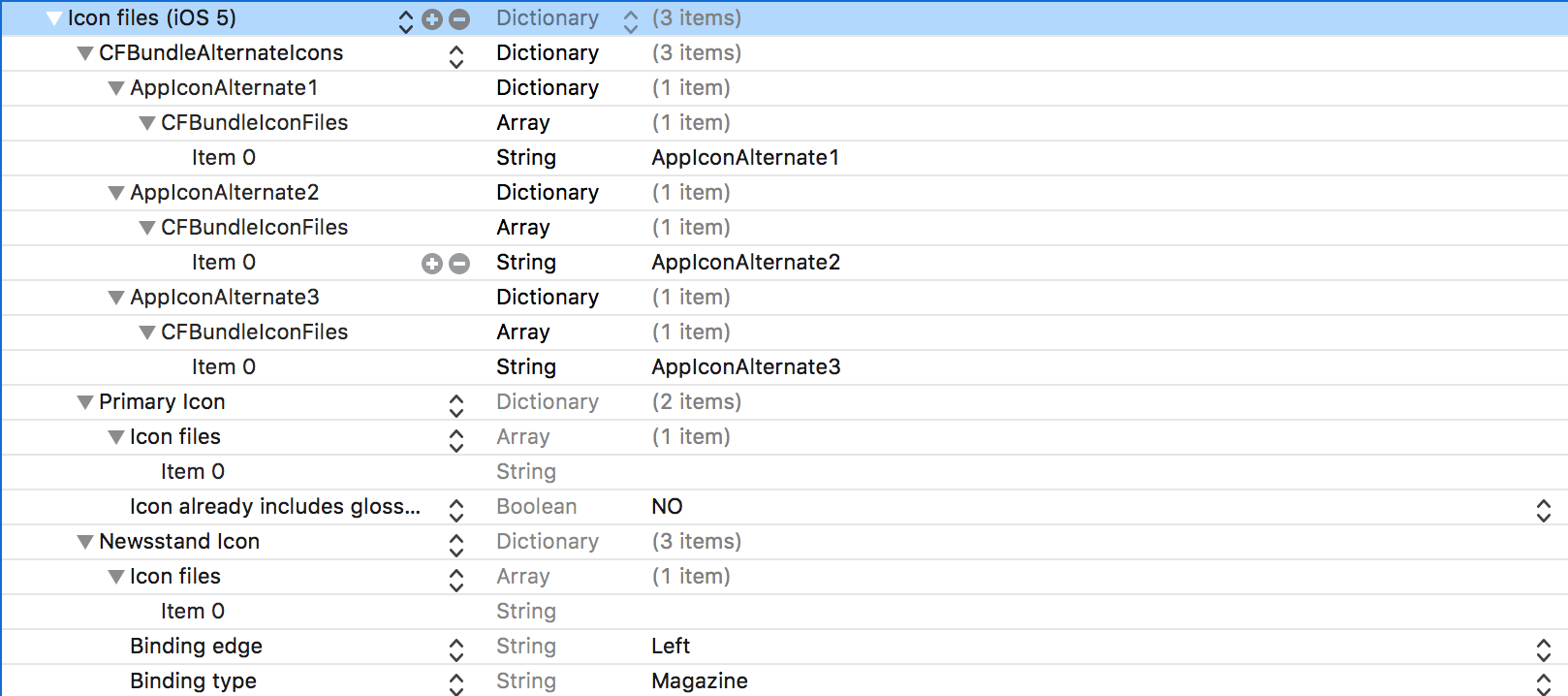
- Add `Icon files (iOS 5)`/`CFBundleIcons` to the Info.plist
- Add `CFBundleAlternateIcons` as a `Dictionary`, it is used for alternative icons
- Set 3 dictionaries under `CFBundleAlternateIcons`, they are correspond to "AppIconAlternate1", "AppIconAlternate2", and "AppIconAlternate3"
- For each dictionary, create one properties `CFBundleIconFiles` as `Array`. The array value for key `CFBundleIconFiles` includes the icon files.
**Info.plist screenshot**
**Info.plist source code**
```xml
CFBundleIcons
CFBundleAlternateIcons
AppIconAlternate1
CFBundleIconFiles
AppIconAlternate1
AppIconAlternate2
CFBundleIconFiles
AppIconAlternate2
AppIconAlternate3
CFBundleIconFiles
AppIconAlternate3
CFBundlePrimaryIcon
CFBundleIconFiles
UIPrerenderedIcon
UINewsstandIcon
CFBundleIconFiles
UINewsstandBindingEdge
UINewsstandBindingEdgeLeft
UINewsstandBindingType
UINewsstandBindingTypeMagazine
```
## 3\. Code
Let us assume we have 4 buttons in a view. Tap any of them would make the app to display a correspond icon. Here is the sample code:
```swift
@IBAction func appIcon1Tapped(_ sender: UIButton) {
changeIcon(to: "AppIconAlternate1")
}
@IBAction func appIcon2Tapped(_ sender: UIButton) {
changeIcon(to: "AppIconAlternate2")
}
@IBAction func appIcon3Tapped(_ sender: UIButton) {
changeIcon(to: "AppIconAlternate3")
}
@IBAction func resetAppIconTapped(_ sender: UIButton) {
//Set the icon name to nil, the app will display its primary icon.
changeIcon(to: nil)
}
func changeIcon(to name: String?) {
//Check if the app supports alternating icons
guard UIApplication.shared.supportsAlternateIcons else {
return;
}
//Change the icon to a specific image with given name
UIApplication.shared.setAlternateIconName(name) { (error) in
//After app icon changed, print our error or success message
if let error = error {
print("App icon failed to due to \(error.localizedDescription)")
} else {
print("App icon changed successfully.")
}
}
}
```
## 4\. Demo Video
**Ref-** [Apple Documentation](https://developer.apple.com/documentation/uikit/uiapplication/2806818-setalternateiconname?ref=developerinsider.co)