
Apple's original Developer ID Certification Authority expires on 1 February 2027. Every Developer ID certificate it issued stops working that day. If you ship a Mac app, command line tool, DMG or .pkg outside the Mac App Store, you need a new Developer ID G2 certificate. I just moved my own app over, so here is the short version with the exact steps.
Short answer:
- Create a new Developer ID Application certificate and pick G2 Sub-CA on the developer portal.
- Apps you already shipped keep working if they are notarized.
- Installer packages (.pkg) signed with the old certificate stop installing on 1 February 2027.
- After that date you can't sign or notarize anything with the old certificate.
Sources from Apple:
- Upcoming expiration of Developer ID Certification Authority
- Apple Email (Action needed: Your Developer ID certificate is expiring.)
- Replacing Developer ID certificates issued from the previous Sub-CA
What is changing with Developer ID certificates?
- Every Developer ID certificate is issued by an Apple intermediate authority, called a Sub-CA.
- The original Sub-CA expires on 1 February 2027. Every certificate it issued stops working that day, even one you created yesterday.
- The replacement is called G2. It is valid until 2031.
- So you need a new Developer ID certificate issued by G2.
Who is affected?
- Affected: anything you sign with a Developer ID Application or Developer ID Installer certificate. That means Mac apps, command line tools, DMGs and .pkg installers that you distribute outside the Mac App Store.
- Not affected: Mac App Store builds, iOS apps, and Apple Development or Apple Distribution certificates. Those come from a different authority.
How do I check if my certificate is affected?
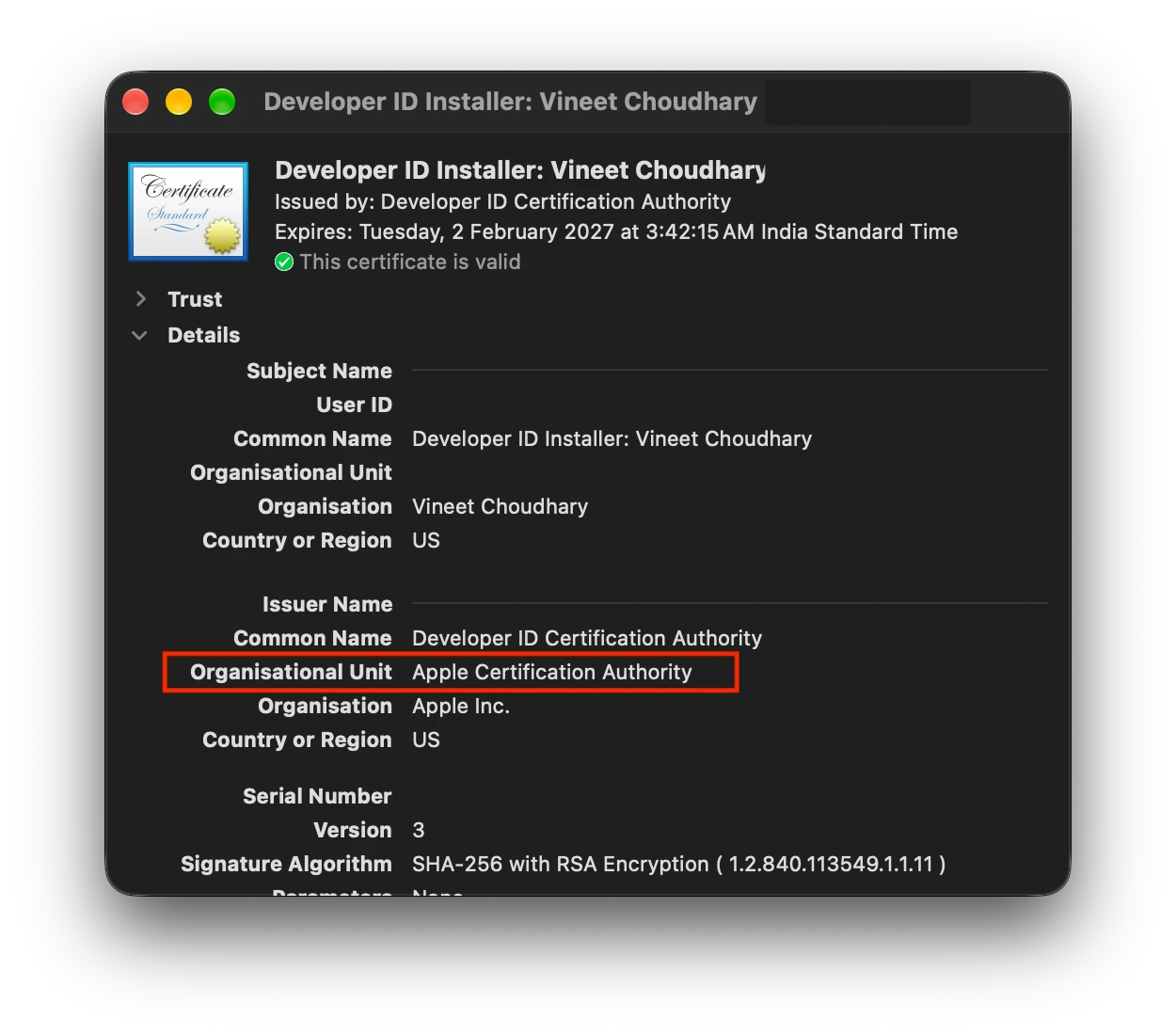
- Open Keychain Access and find "Developer ID Application: Team Name (TEAMID)".
- Double click it and look at Issuer Name > Organizational Unit.
Apple Certification Authoritymeans it is from the old authority and you need a new one.G2means you are already fine.
What happens to Mac apps I already shipped?
- Notarized apps keep working after 1 February 2027. Notarization requires a secure timestamp, and that timestamp proves the app was signed while the certificate was still valid. Nothing to do.
- Notarized DMGs keep working for the same reason.
- .pkg installers signed with an old certificate stop installing on 1 February 2027. Re-sign them with a G2 Installer certificate before that date.
- Old builds that were never notarized may be blocked by Gatekeeper after the date. If people still download them, rebuild them with the new certificate.
- Do not revoke the old certificate. Letting it expire is safe. Revoking it can break apps that are already out there.
Can I still release a new version with the old certificate?
- Before 1 February 2027: yes, and the release keeps working after the date as long as it is notarized. You are only delaying the switch though.
- After 1 February 2027: no. The certificate has expired, so you can't sign or notarize a new build with it. That includes urgent hotfixes.
- Installer packages: a .pkg signed with the old certificate stops installing on 1 February, even if you shipped it earlier.
My advice is to switch now and ship your next release with G2.
How to move to a Developer ID G2 certificate
Step 1. Use a recent Xcode
Apple asks for Xcode 11.4.1 or later. Any current Xcode is fine.
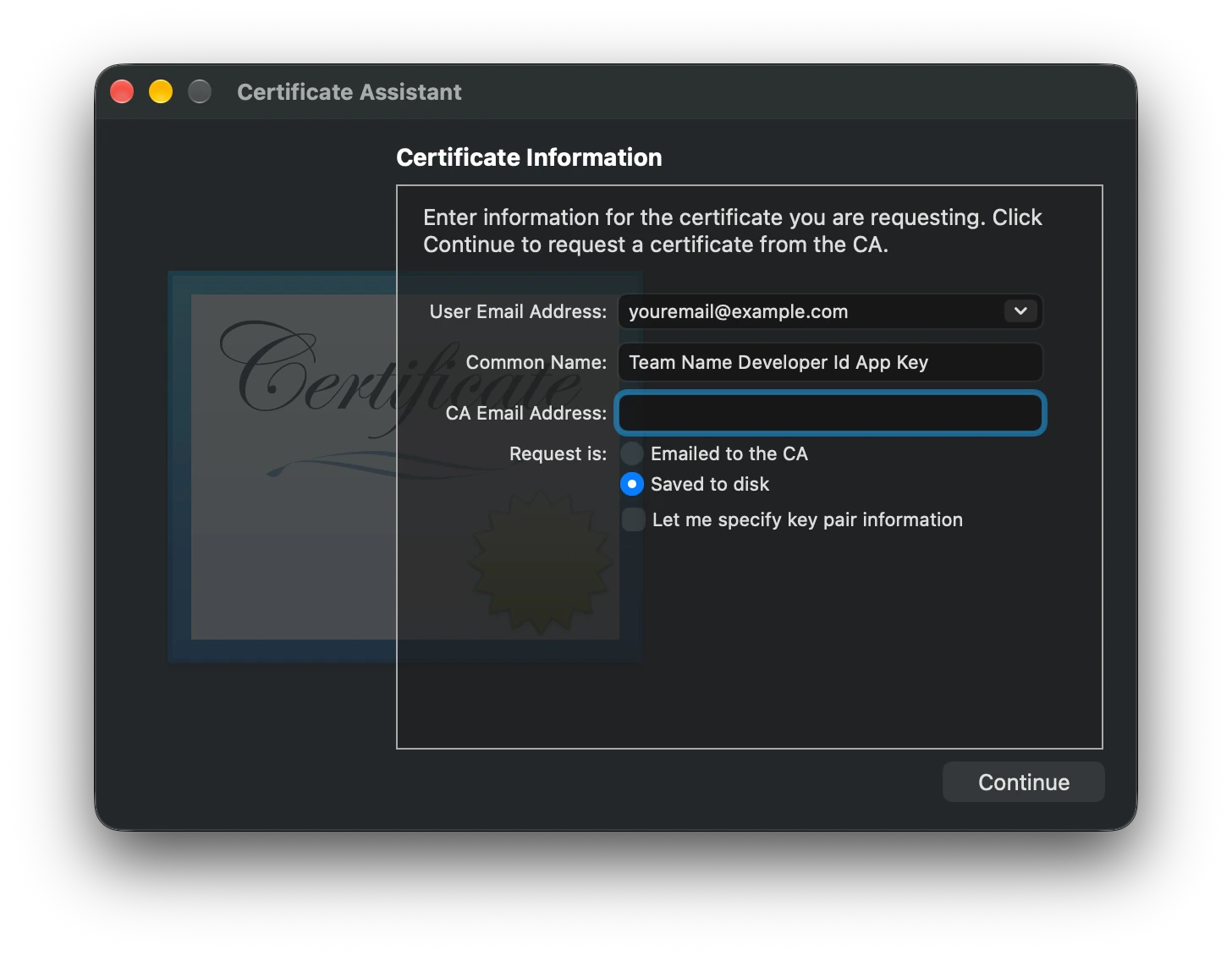
Step 2. Create a certificate signing request
- Open Keychain Access.
- Go to Keychain Access > Certificate Assistant > Request a Certificate From a Certificate Authority.
- Enter your email and name, choose Saved to disk, and save the file.
Step 3. Create the certificate on the developer portal
-
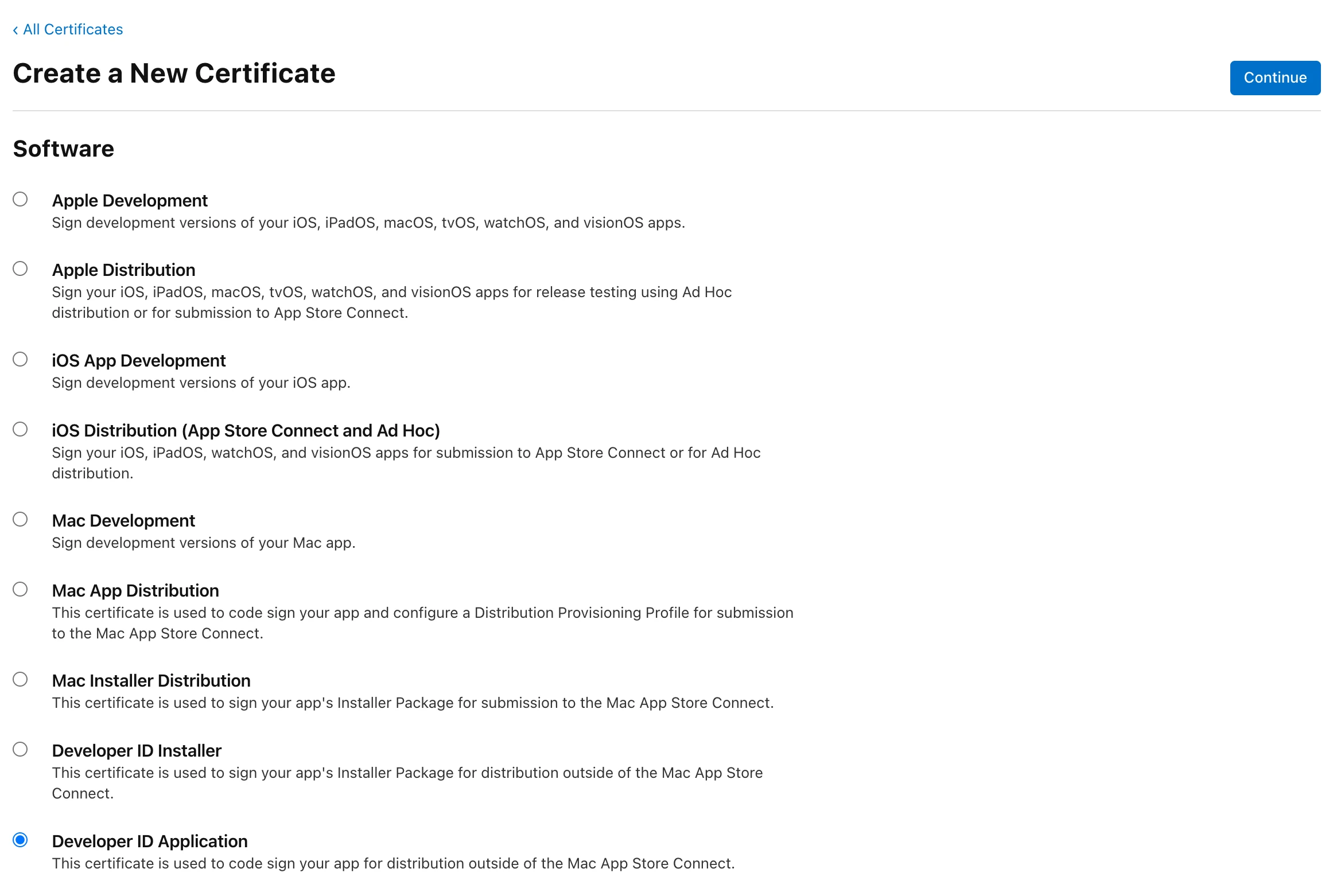
Open Certificates, Identifiers & Profiles and click +.
-
Under Software, select Developer ID Application. Be careful here. Developer ID Installer sits right next to it and is easy to pick by mistake.
-
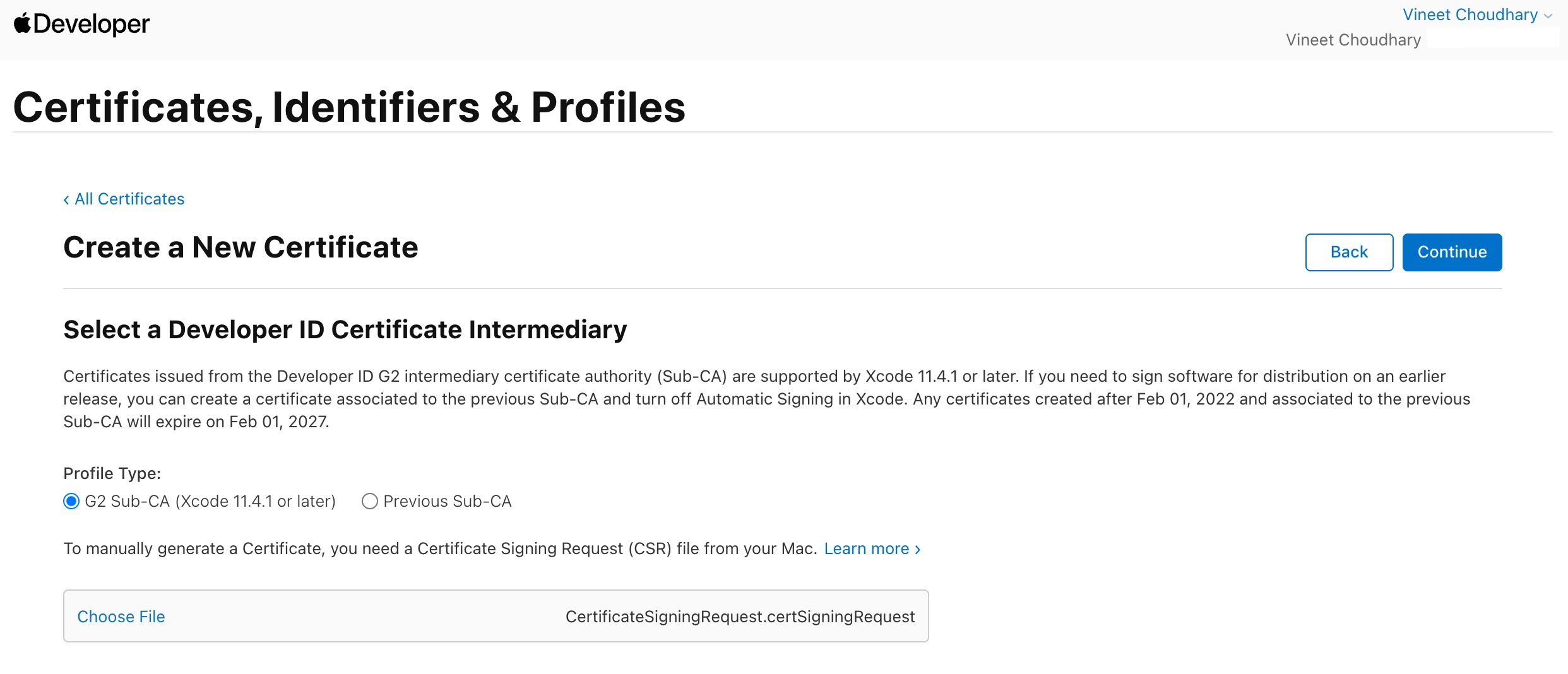
When asked for the intermediary, select G2 Sub-CA (Xcode 11.4.1 or later). Any other option can give you a certificate that still expires in 2027.
-
Upload your signing request, download the certificate and double click it to add it to your keychain.
Step 4. Check the new certificate
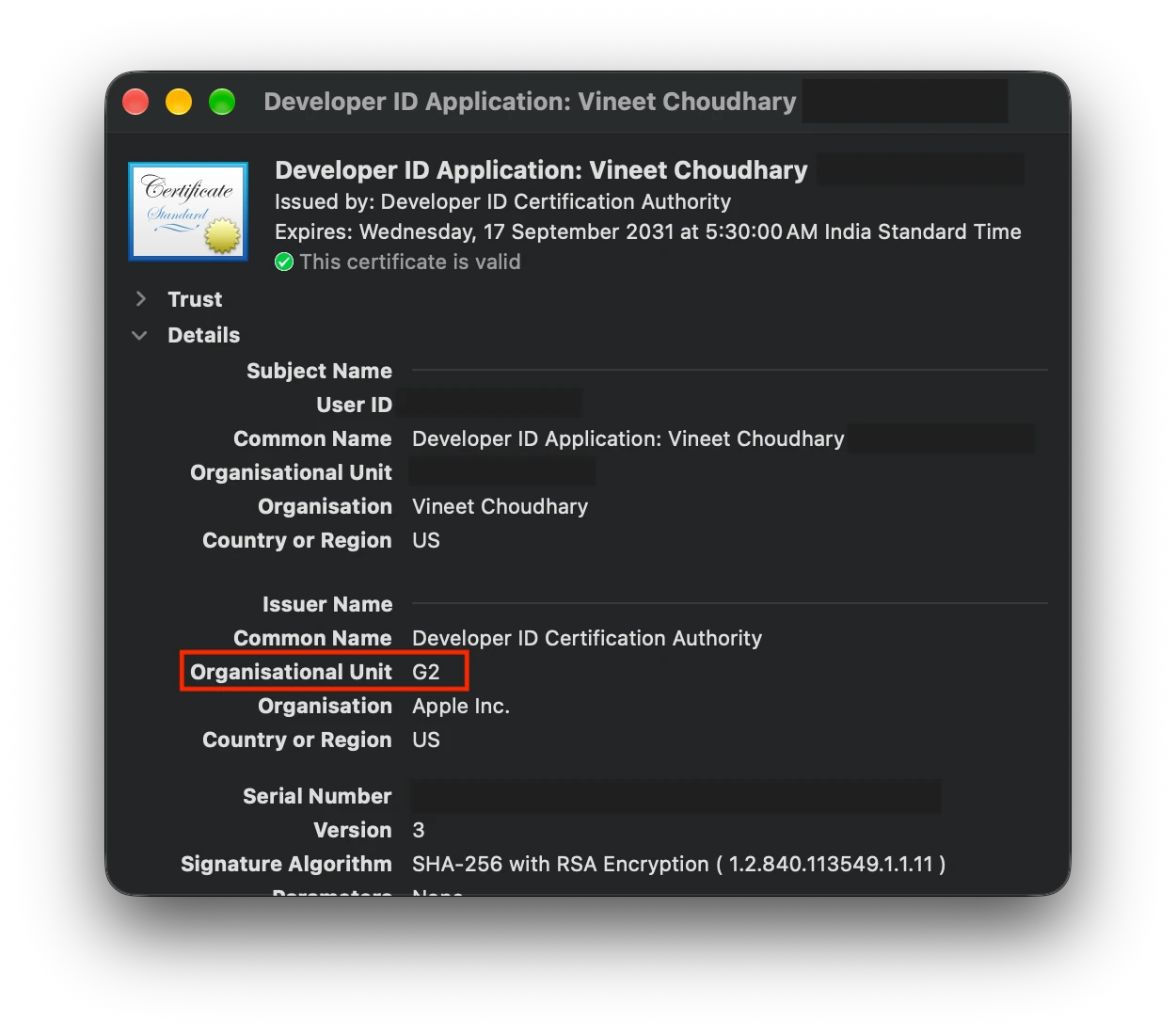
- Open the new certificate in Keychain Access.
- Organizational Unit under Issuer Name should say
G2. - The expiry date should be well past 2027.
If Keychain Access says the certificate is not trusted, download the "Developer ID - G2" intermediate from Apple PKI and double click it.
Step 5. Do the same for Installer (only if you ship .pkg files)
Repeat steps 2 to 4 and pick Developer ID Installer instead. Then re-sign your packages before 1 February 2027.
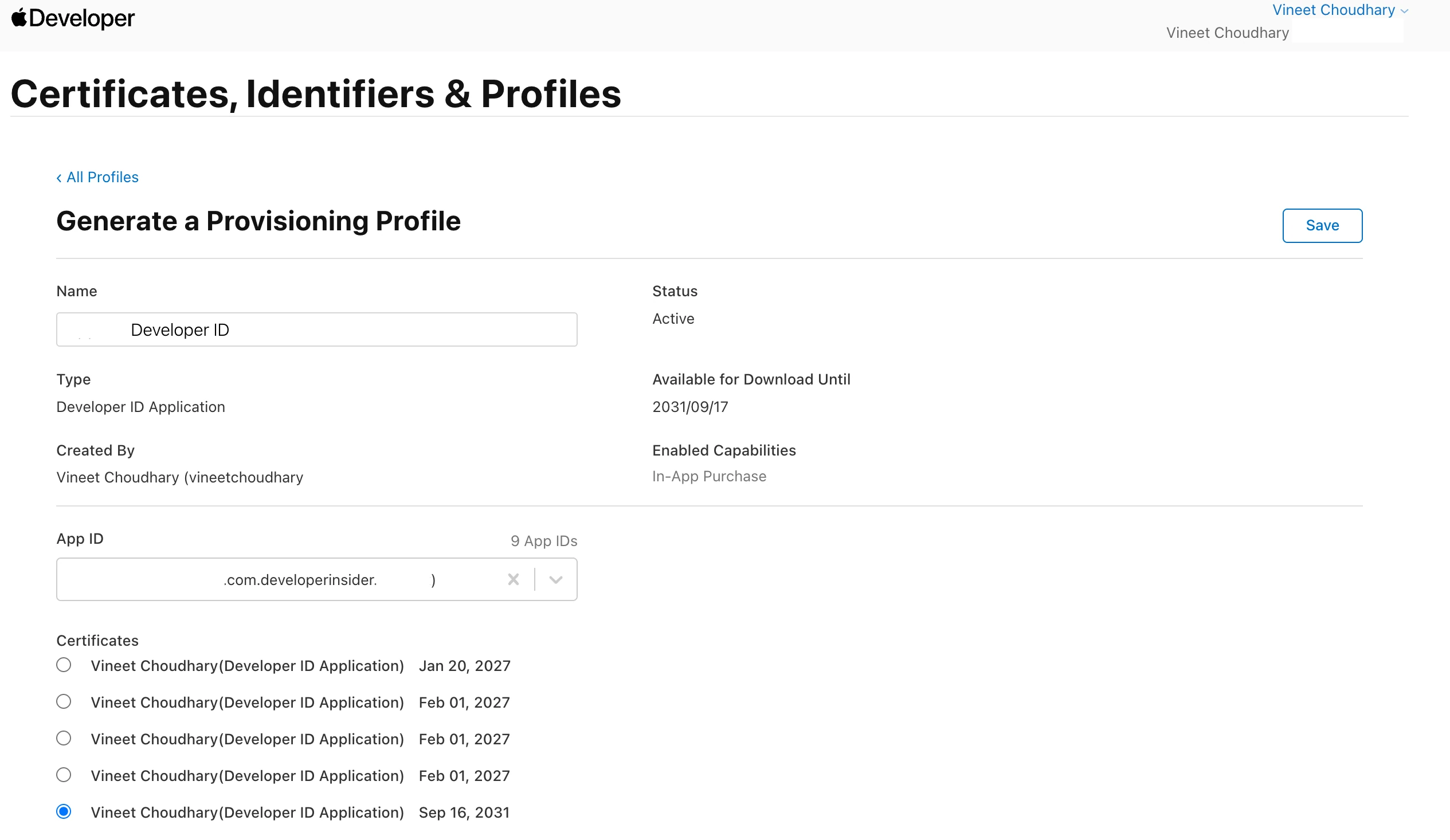
Step 6. Update your provisioning profile (only if you have one)
- Most Developer ID apps don't need a profile at all. You only need one for restricted capabilities like iCloud, push notifications or keychain access groups.
- A plain command line tool can't carry a profile, and a DMG never needs one.
- If you do have one, open it on the portal, click Edit, select the new certificate, then save and download it.
- Editing creates a new profile with the same name. Delete the old copy from
~/Library/Developer/Xcode/UserData/Provisioning Profilesso Xcode can't pick the stale one.
Step 7. Back up the old certificate and remove it from your keychain
With both certificates installed, you have two identities with the exact same name. codesign then complains that the identity is ambiguous, or your build quietly uses the old one.
- In Keychain Access, expand the old certificate and select it together with its private key.
- Choose File > Export Items and save it as a
.p12file with a strong password. - Keep that password in your password manager.
- Delete the old certificate and its private key from the keychain.
- Do not revoke it on the portal.
If you prefer to keep both, sign with the SHA-1 hash of the new certificate instead of its name. This command shows the hash:
security find-identity -v -p codesigning
Step 8. Ship your next release with G2
Build, sign and notarize as usual. Then confirm the app really uses the new certificate:
codesign -d --extract-certificates MyApp.app
openssl x509 -inform der -in codesign0 -noout -issuer -enddate
The issuer should contain OU=G2. Something like this:
➜ openssl x509 -inform der -in codesign0 -noout -issuer -enddate
issuer= /CN=Developer ID Certification Authority/OU=G2/O=Apple Inc./C=US
notAfter=Sep 17 00:00:00 2031 GMT
Then make sure Gatekeeper accepts the app:
spctl -a -vv MyApp.app
You want to see source=Notarized Developer ID. Something like this:
➜ spctl -a -vv MyApp.app
MyApp.app: accepted
source=Notarized Developer ID
origin=Developer ID Application: Vineet Choudhary (XXXYYYZZZ)
FAQ
Will my users notice anything after I switch to G2?
No. macOS recognises your app by its bundle ID and Team ID, not by one specific certificate. Users keep their saved Keychain items and privacy permissions, and updaters that check code signatures, like Sparkle, accept the new build. To double check, run codesign -d -r- MyApp.app on an old build and a new build. The output should match.
Does this affect iOS apps or the Mac App Store?
No. Only Developer ID certificates are affected. iOS apps, Mac App Store builds, Apple Development and Apple Distribution certificates come from a different authority.
How long is a Developer ID G2 certificate valid?
Apple's guide says one year. The certificate I created runs until September 2031, when the G2 authority itself expires. Check the expiry date on yours.
Should I revoke my old Developer ID certificate?
No. Let it expire. Revoking it can stop apps you already shipped from opening.
Action needed: Your Developer ID certificate is expiring.
If you got this email from Apple and searched for it, you are in the right place. Here is the full text for reference.
Hello,
Your team holds one or more Developer ID certificates issued by the original Developer ID Certification Authority (Sub-CA). This authority expires on February 1, 2027, and any certificates it issued will stop working on that date.
What to do:
Check if you’re affected. In Certificates, Identifiers & Profiles, look for certificates expiring on or before February 1, 2027. See Replacing Developer ID certificates issued from the previous Sub-CA for help identifying your certificate’s authority.
Create a new certificate. Generate a replacement from the current authority, Developer ID Certification Authority (G2). Note: This certificate authority is valid until 2031, but the certificates issued by the certificate authority expire annually and must be renewed each year.
- If you’re using Xcode 11.4 or earlier, update before creating your new certificate.
- When prompted for a Developer ID Certificate Intermediary, select G2 Sub-CA. Choosing another option may issue a certificate that also expires in 2027.
Re-sign based on what you distribute.
- Installer packages (.pkg): Starting February 1, 2027, .pkg files signed with an affected certificate will no longer install. Re-sign all packages with your new certificate before this date.
- Mac apps: Previously signed and notarized Mac software (with a secure timestamp) will keep working — no action needed. For future updates, sign with your new certificate and include a secure timestamp for notarization.
If you have any questions, please contact us.
The Apple Developer Relations Team
Source: email from the Apple Developer Relations Team. The same notice is on Apple Developer News.